
Your law firm is spending money to make the phone ring. Google Ads. Local Services Ads. Referral fees. Directory listings.
Then the phone rings and nobody picks up.
According to Clio's 2024 Legal Trends Report, only 4 in 10 law firms answer the phone when a potential client calls. Nearly half of all firms in the study were completely unreachable. No answer, no callback, no reply.
That is not a customer service problem. It is a revenue problem.
The average legal services lead costs $649 to generate (First Page Sage, 2025). Every call that rolls to voicemail and goes unanswered is $649 in ad spend you already paid for. And 80% of callers who reach voicemail hang up without leaving a message and never call back. They call the next firm on the list.
The first attorney to respond wins 78% of the time.
So your marketing budget is generating leads, your phone is ringing, and your phone system is handing those leads to the firm across the street. If your practice takes 20 potential client calls a week and misses just 28% of them (the law firm industry average per CallRail), you are burning roughly $4,700 per week in wasted marketing spend. Over a year, that is north of $240,000.
The fix does not require a bigger marketing budget. It requires a phone system that works for a law firm.
What Actually Matters in a Law Firm Phone System
Ranking phone systems by feature count is a waste of your time. A plumbing company and a personal injury practice have completely different requirements. Here are the six things that actually matter when your work involves client confidentiality, matter-based workflows, and paralegals who need call context before they can do anything useful.
1. A shared number the whole firm can see. When a client calls your main line, reception, paralegals, and attorneys should all have visibility into that conversation. Not just the person who happened to answer. Every voicemail, every text, every call recording should live in one shared thread.
2. Call routing that sorts inquiries automatically. Personal injury callers should hear one greeting. Estate planning callers should hear another. After-hours callers should get a different path than daytime callers. A phone menu handles this so your team only picks up calls they can actually help with.
3. Internal team notes without leaving the app. When a paralegal picks up a call for an attorney who is in court, they need to leave a note on that specific call. Not send a personal text. Not scribble it on a Post-it. The note should be attached to the conversation so the attorney sees it the moment they check their phone.
4. After-hours routing that actually works. Criminal defense calls come in at 2am. Family law inquiries spike on Sunday nights. The first firm to respond wins. Your phone system should route after-hours calls to the attorney on call, send them to voicemail with instant transcription, or play a recorded message with your office hours and callback instructions.
5. Call recording and documentation built in. If you record client calls (with proper consent), those recordings should be searchable, transcribed, and tied to the caller's thread. Not buried in a separate voicemail system nobody checks.
6. Personal numbers stay private. Using personal cell phones for client communication is an ethics risk. Text messages from a personal number are discoverable, unsecured in transit, and impossible to audit. A dedicated business number with professional caller ID solves this.
Phone2: $7/Month, 99.9% Uptime
Phone2 is a cloud phone system designed for small teams. It runs on iOS, Android, Mac, Windows, and the web. No hardware, no IT department, no desk phones collecting dust. Uptime sits at 99.9%.
Pro starts at $9/month with our promotional pricing. That gets you a local or toll-free number, unlimited US and Canada calling, a shared team inbox, call recording, phone menus (IVR), the call flow builder, and apps for every device your team carries. Add more users and lines as your firm grows.
Here is how Phone2 handles each of the six things law firms care about.
One Number, Your Whole Firm
Every Phone2 plan includes shared phone numbers. Your main office line is visible to everyone on your team. When a call comes in, it can ring the whole firm simultaneously, follow a round-robin rotation, or route based on rules you set.
The important part: every team member sees the same conversation history. Calls, texts, voicemails, and internal notes all appear in one timeline for each contact. Your receptionist sees that a paralegal already texted the client back. Your attorney reads the voicemail a new lead left last night. Nobody has to ask "did anyone call them back?" because the answer is right there.
You can assign any conversation directly to a specific person. If a voicemail comes in that needs paralegal follow-up, tag them. They get notified and see the full context before picking up the phone.
This is not how most phone systems work. Grasshopper, for example, does not have true shared numbers. It forwards calls to individual extensions with separate inboxes. There is no shared view, no internal notes, and no way to hand a conversation to a colleague. Every person on the team works in a silo and nobody sees the full picture.
Route Calls Before a Human Touches Them
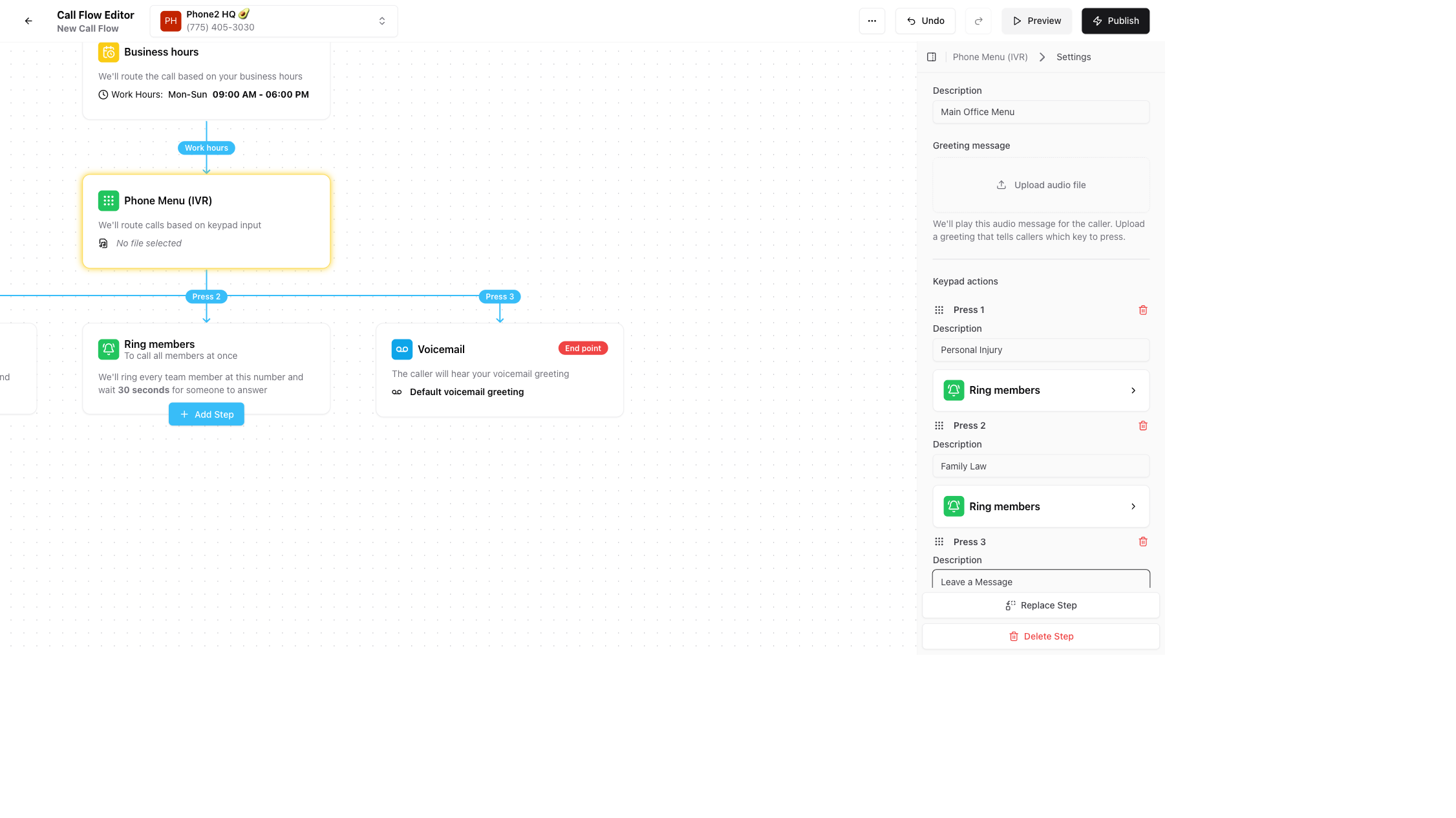
Phone2 Pro ($9/month with promo pricing) unlocks the call flow builder. This is a visual drag-and-drop tool where you map out exactly what happens when someone calls your firm.
A typical law firm setup looks like this:
During business hours (8am to 6pm):
- Caller hears: "Thank you for calling Smith and Associates."
- Press 1 for personal injury. Rings the PI team.
- Press 2 for family law. Rings the family law paralegal.
- Press 3 for information about your claim. Plays a recorded message with office hours, location, and how to check case status.
- Press 0 to speak with someone directly. Rings the front desk.
After hours (6pm to 8am):
- Caller hears: "Our office is currently closed. Normal hours are Monday through Friday, 8am to 6pm."
- Press 1 to leave a message. Routes to voicemail with instant transcription.
- Press 2 for urgent matters. Forwards to the attorney on call.
You record each greeting and informational message directly inside the app. Need a new recording for your holiday schedule? Do it from your phone in 30 seconds. No vendor call, no support ticket, no waiting around.
The routing rules are built with conditions (time of day, caller ID, menu selection) and destinations (ring group, specific person, voicemail, recorded message). If one path does not answer, you configure a fallback. The system keeps trying until somebody or something picks up.
That is the difference between a phone system that answers and one that sends your next client to voicemail.
Internal Notes That Stay on the Call
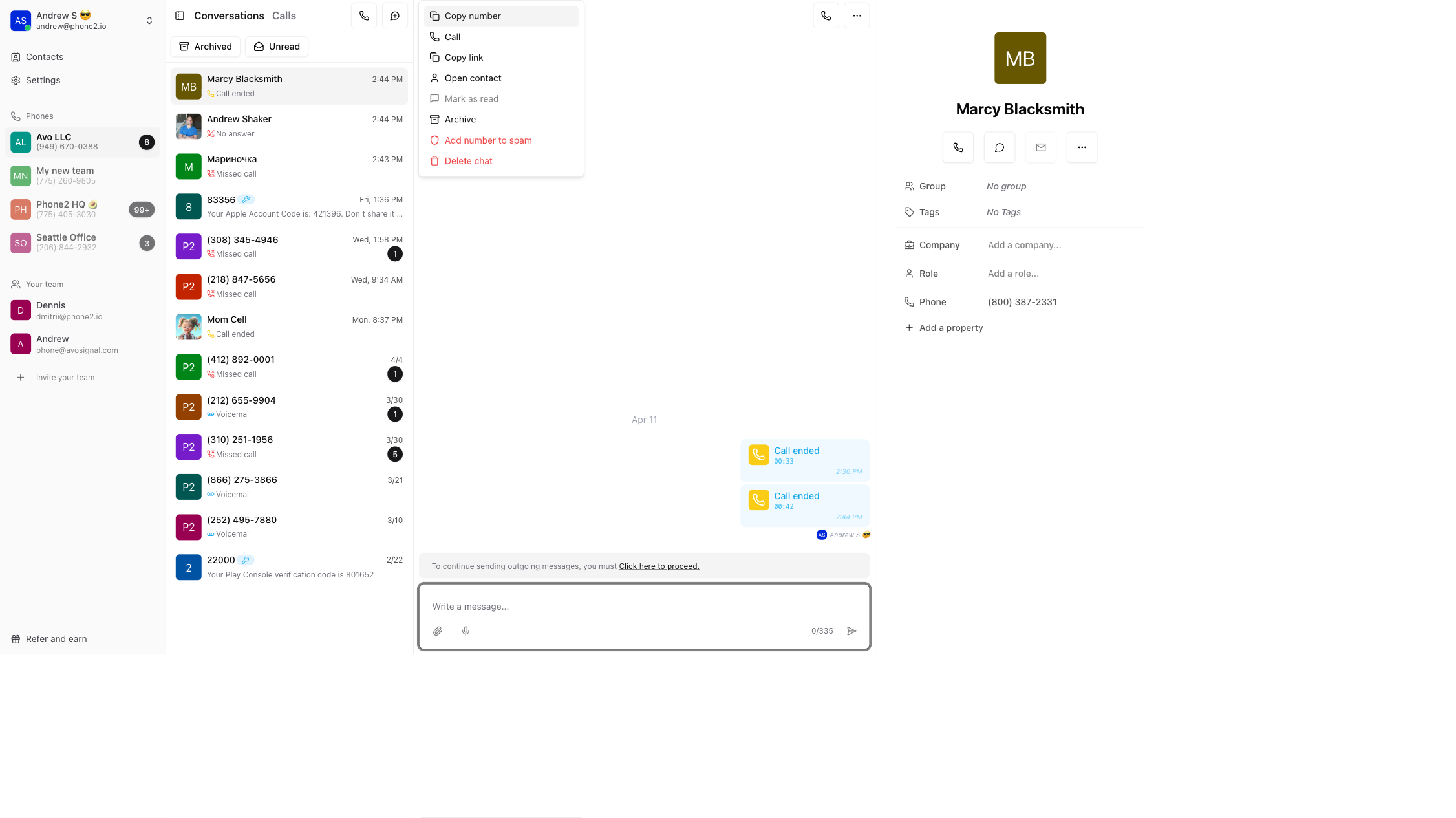
Every conversation in Phone2 has a private internal notes section visible only to your team. No switching apps. No texting from your personal phone. The coordination happens right on the conversation thread.
Here is how it works in practice: a new lead calls your main number. Your receptionist answers, qualifies the caller, and adds an internal note directly on the conversation: "PI case, car accident on I-95, wants consult this week." They assign the conversation to the PI paralegal. The paralegal gets a push notification, sees the full call history and the internal note, and calls back from the same business number with everything they need.
The client never sees any of the internal notes. They just experience a firm that seems remarkably organized.
If your team already uses Slack, Phone2 Pro integrates directly. Calls and messages trigger Slack notifications, and your team can coordinate without switching apps. But even without Slack, the internal notes and conversation assignment features mean your team handles the entire workflow inside one app.
Your firm deserves a phone system that actually picks up.
Phone2 Pro starts at $9/month with shared numbers, call routing, IVR, call recording, and a team inbox your whole firm can see. Setup takes five minutes. Porting your number is free.
Try Phone2 for Your Law Firm30-day money-back guarantee. No contracts. No activation fees.
How Phone2 Compares
Here is a quick look at the providers law firms actually consider, followed by what stands out about each one.
| Provider | Price | Shared inbox | IVR | Recording | Porting |
|---|---|---|---|---|---|
| Phone2 | $9/mo | Yes, all plans | Yes | Yes | Free |
| Quo | $15/user | Yes | $23+ tier | $23+ tier | Free |
| Ooma | $19.95/user | No | Yes | $24.95+ tier | $39.99/num |
| RingCentral | $20/user | Yes | Yes | $25+ tier | Free |
| Grasshopper | $14/mo | No | Basic | $55 tier | Free |
Phone2 starts at $9/month through our promo pricing, less than half the price of every other provider on this list. That includes shared numbers, a shared team inbox, call recording, IVR, and the visual call flow builder. Porting is free with no activation fees. No contracts, 30-day money-back guarantee.
Quo (formerly OpenPhone) is the closest competitor on collaboration features. Shared inbox and internal threads work well. The catch: IVR, auto recording, and analytics are locked behind the $23/user Business tier. Good product, higher floor for the features law firms need.
Ooma Office gets recommended in a lot of "best phone for law firms" roundups because of its Clio integration. But the $19.95 starting price is misleading. Internal notes, team chat, and AI transcription only appear on Pro Plus at $29.95. And porting costs $39.99 per number plus a $29.95 activation fee. If you are porting two numbers, that is over $100 before your first bill.
RingCentral has the deepest feature set and strong legal integrations (Clio, Smokeball, Lawmatics). It is also the most expensive and the hardest to leave. Annual contracts with 30-day cancellation notice, auto-renewal complaints, and customers reporting difficulty porting numbers out. Good for mid-size firms with IT support. Overkill for a five-person practice.
Grasshopper does not belong in a serious law firm comparison. No shared numbers, no shared inbox, no internal notes, no call assignment, no CRM integrations. It is a call forwarding service from 2003 that solo attorneys still buy out of brand recognition.
The Real Cost of Getting This Wrong
Back to the math.
A five-attorney personal injury firm running ads takes roughly 30 inbound calls per week. At a 28% missed call rate, that is about 8 missed calls a week. Over a year, 416 missed leads.
At $649 per lead, that is $270,000 in wasted marketing spend.
Now apply case value. The average personal injury attorney fee on a settled case runs between $13,000 and $18,000. At a conservative 15% lead-to-client conversion, those 416 missed leads represent roughly 62 signed cases that went to another firm. At $15,000 per case, that is over $930,000 in revenue your practice never saw.
Your firm does not need to overhaul everything at once. It needs a phone system that picks up, routes correctly, and gives your team shared visibility into every conversation.
Phone2 Pro starts at $9/month. Porting your existing number is free. No contracts, no activation fees, and setup takes five minutes.

Written by Courtney Wilson
Product Analyst
Courtney writes practical guides that help small businesses pick the right tools and avoid overspending on the wrong ones.